Niagara button
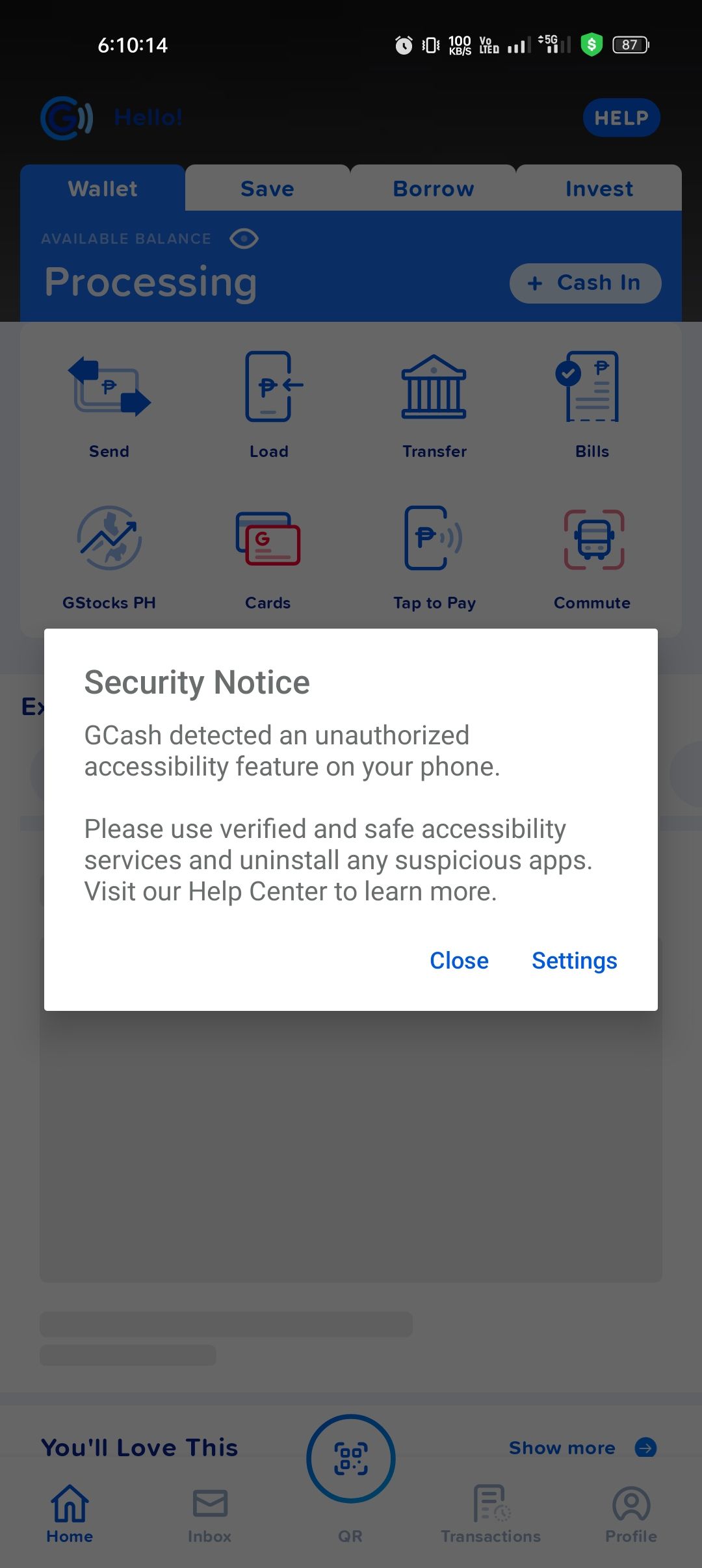
Im not able to access my gcash once i turned on the accessibilty access. See attached pic for error. Before it is working without any issue.
- Manufacturer and Device Name
- Android Version
- Problem occurs with other Launchers
- Niagara Launcher Version
Log in to comment and vote
Comments1
NL Help Bot
Oct 1
Thanks for the screenshot, that one makes it clear. The notice comes from GCash rather than from Niagara: finance and banking apps run their own security checks, and some of them refuse to start while any third-party accessibility service is switched on. Niagara's accessibility service is what GCash is detecting here.
Niagara uses that permission for exactly two things: the double tap to sleep gesture (Double Tap to Sleep) and as a workaround for an Android freezing bug that only affects Android 14 and newer. Your report says Android 13, so that second one is not doing anything for you anyway. Switching the service off under Android's settings > Accessibility > Niagara Launcher should let GCash open normally again, and the only thing you give up is the double tap gesture.
If GCash still complains with the service off, say so here in the thread. Some apps flag any third-party launcher no matter which permissions it holds, and that check sits with the app's developer rather than with us.
Linked to GCash blocked by Niagara Accessibility Service