Niagara Settings UI renders duplicated/overlapping on Motorola Moto G6 Plus
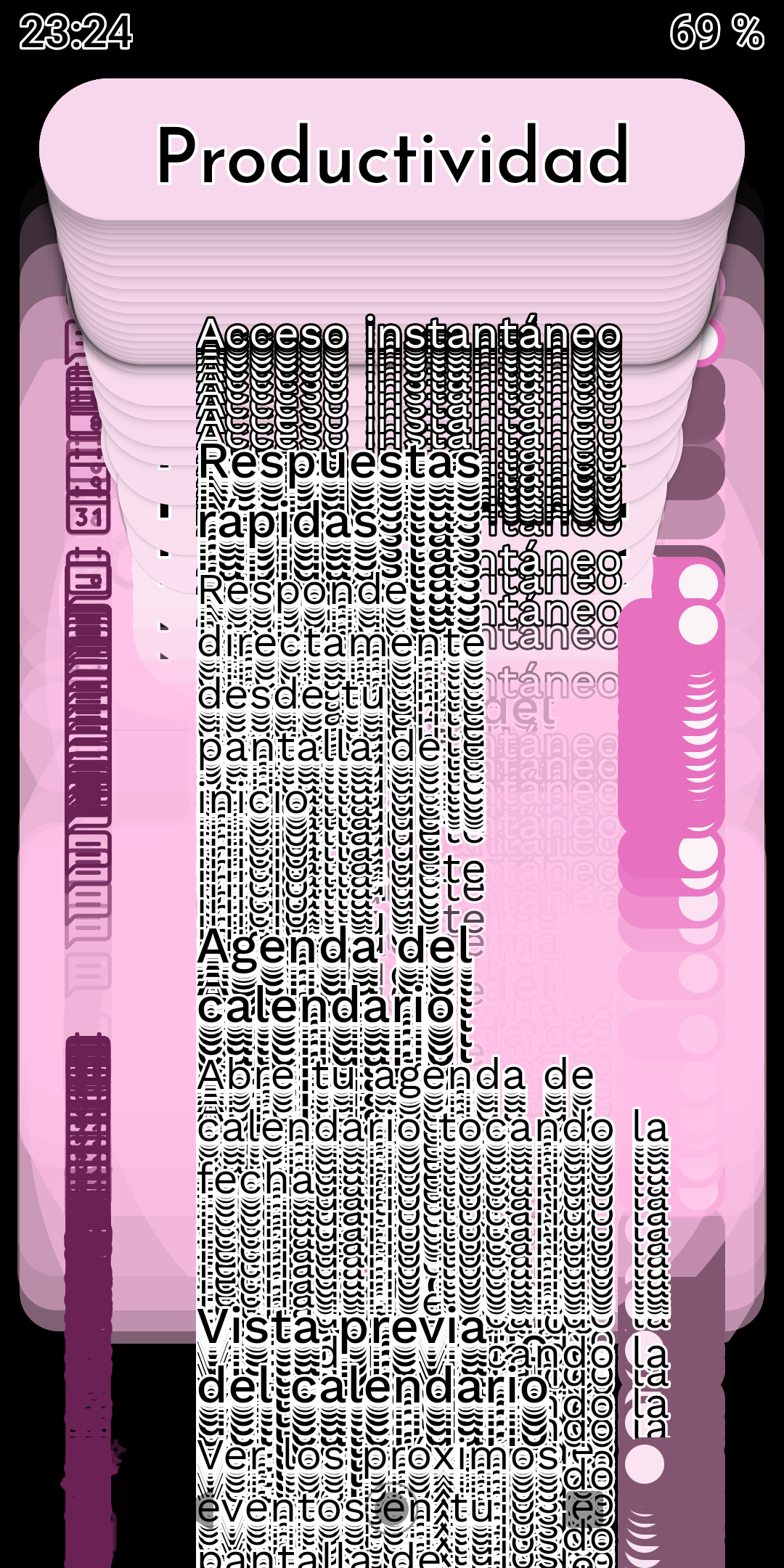
When opening Niagara Settings on a Motorola Moto G6 Plus, the entire settings interface becomes visually corrupted. Multiple copies of the UI elements and text are rendered on top of each other, making the settings screen almost unusable.
The user also noticed that the device appears to switch into dark mode immediately before the issue occurs.
Outside of Niagara Settings, the launcher continues to work normally.
The issue persists after:
Restarting the phone
Restarting/force-stopping Niagara Launcher
Uninstalling and reinstalling Niagara Launcher
The same Niagara Launcher version is installed on the user's second device, an LG phone running Android 11, where the issue does not occur.
Steps to reproduce the behavior:
Use Niagara Launcher on a Motorola Moto G6 Plus.
Open Niagara Settings.
The display appears to switch to dark mode.
The settings interface becomes duplicated and layered repeatedly on top of itself.
Leave Niagara Settings.
Niagara's normal home screen functionality continues to work correctly.
- Manufacturer and Device Name
- Android Version
- Problem occurs with other Launchers
- Niagara Launcher Version
Log in to comment and vote
Comments3
Surfer Bot
Aug 31
Thanks for collecting the extra reports in this thread, that turned a single device into a pattern. All three devices so far run Android 9, on very different skins, so the Android version looks like the common factor rather than the manufacturer.
If any of the affected users can say whether the settings screen also renders correctly right after a fresh install, before restoring a backup, that would be a useful next data point.
David Eimer
Aug 23
Another user is experiencing the same duplicated/overlapping Niagara Settings UI issue.
Device: Xiaomi Mi A1
Android: 9 (Android One / stock Android, no MIUI)
Niagara Launcher: 1.16.23
The issue occurs while scrolling through Niagara Settings, where UI elements are rendered multiple times on top of each other.
The user also provided a screenshot showing the issue.
David Eimer
Aug 17
Another user is experiencing the same issue:
Device: Realme
Android: 9
Niagara Launcher: 1.16.22
The provided screen recording shows the same duplicated/overlapping UI elements while scrolling through Niagara Settings.
Upvoted on behalf of the user.