New clock styles behave weirdly when moved all the way up
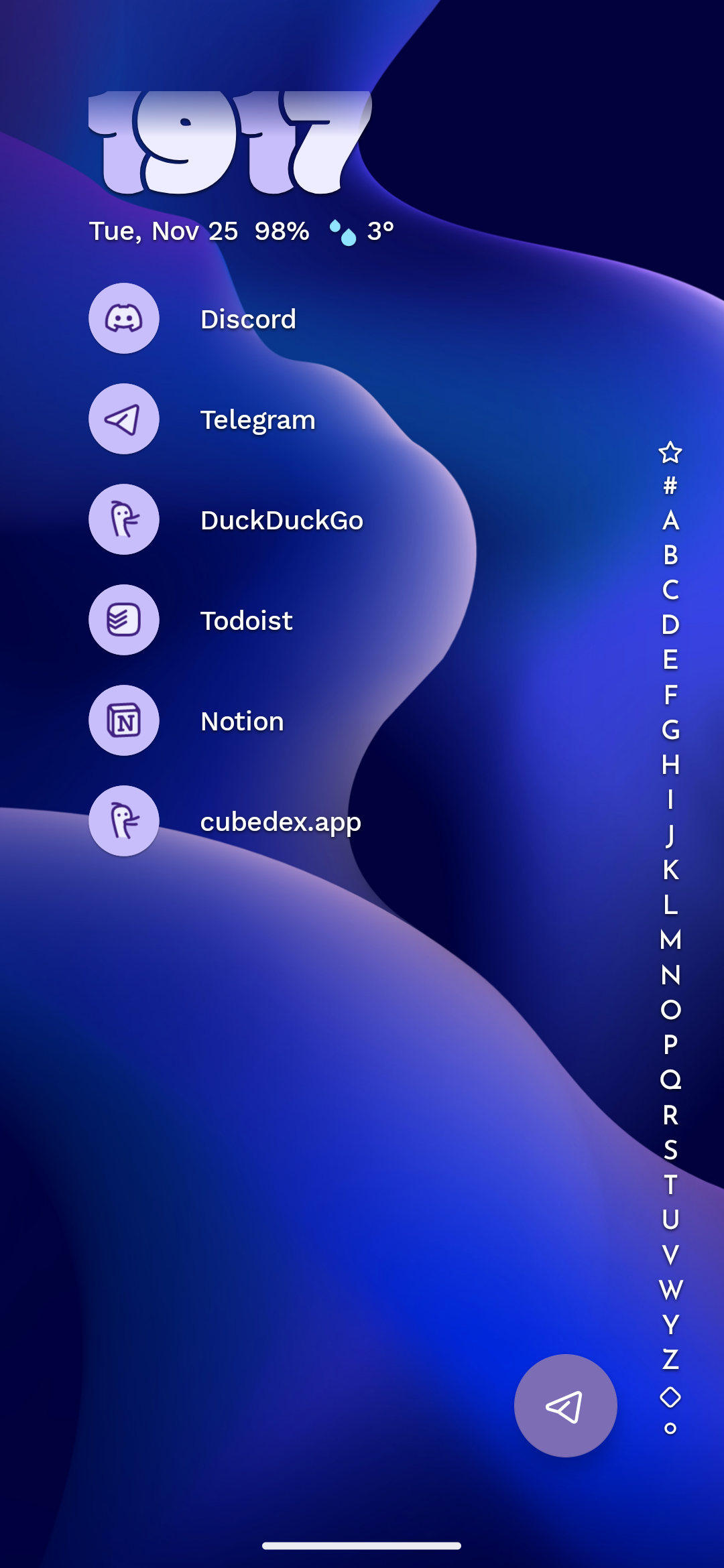
When using certain clock styles added with Niagara Launcher v1.15.0 and moving them up using the “move widget” option, they can behave weirdly. Either not moving all the way up, like for the no clock style, or being cut off in weird places (see screenshots).
I would like this to be fixed.

- Manufacturer and Device Name
- Android Version
- Problem occurs with other Launchers
- Niagara Launcher Version
Log in to comment and vote
Comments3
Tamino Fackler
Jan 8
•Merged request
•1 vote
Vertical clock is cut off on landscape mode
When the vertical clock does not have enough space, it is cut off. This happens a lot when I rotate my phone.
radioparadice
Nov 25, 2025
•Merged request
Clock will no longer shrink to fit space
After the latest update, the plain text clock style will no longer shrink itself to fit the available space when the top widget is reduced in size. Previously, it would shrink to use the same font size as the calendar line below it. Now, it simply cuts itself off at the top. See attached screenshots for comparison. I appreciated the extra real estate this option offered, and hope it can be restored.
Tamino Fackler
Nov 25, 2025
I have created a newer post with more information and a more general request for a fix.
I will merge this one there, as the same issue causes this.
Thanks for reporting this.