App message notifications cannot be deleted.
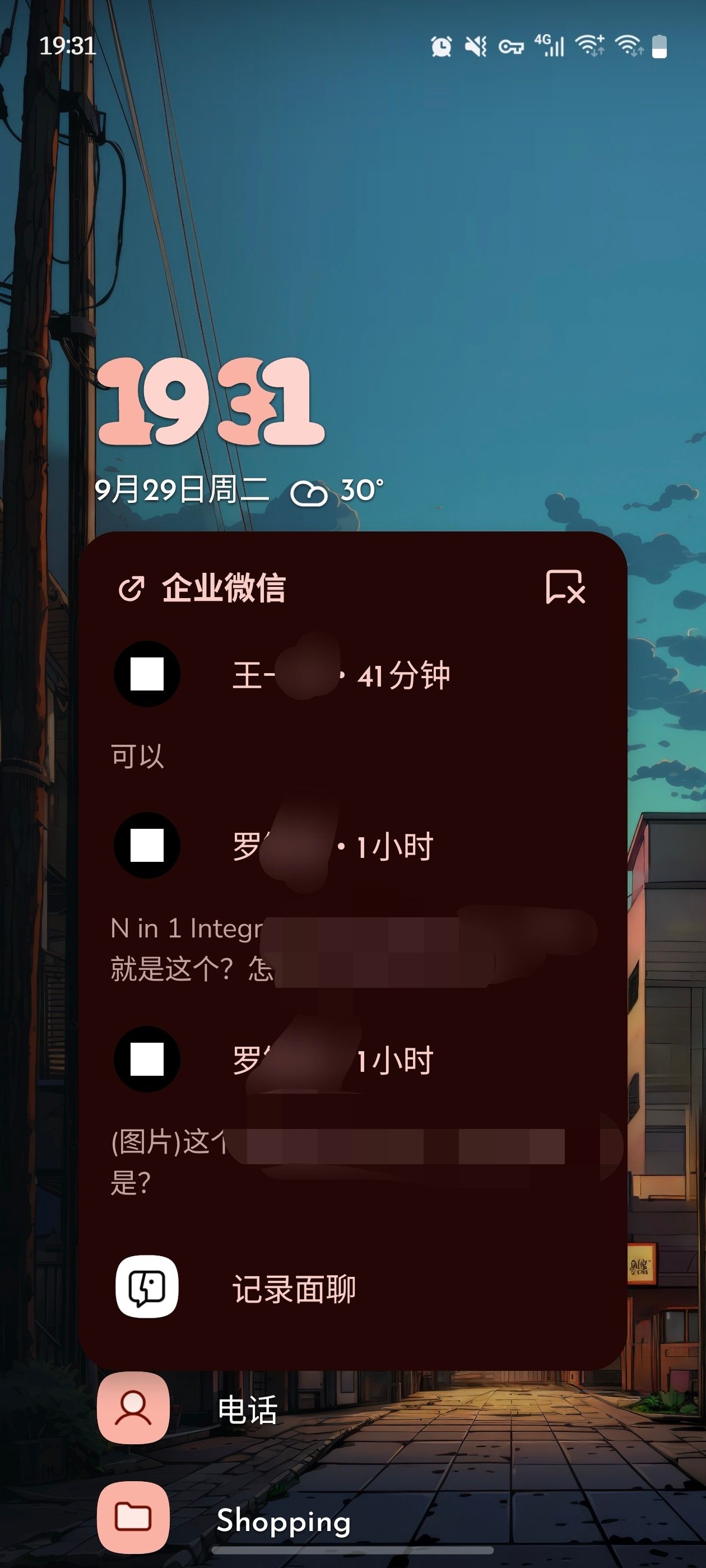
After the app displays a notification, even after you open the app to read it, the notification remains on the home screen and cannot be dismissed—swiping left and tapping “Ignore” or tapping the “✘” in the upper-right corner has no effect. I can confirm that the phone’s notification shade is already completely empty at this point.
This issue occurs occasionally; restarting the app can resolve it temporarily, but it will continue to recur.
- Manufacturer and Device Name
- Android Version
- Problem occurs with other Launchers
- Third-Party Launchers Tested
- Niagara Launcher Version
Log in to comment and vote
Comments2
NL Help Bot
Sep 29
Thanks, the screenshot plus the detail that your notification shade is already empty makes this one clear. It is a known issue: notifications stop reacting to swiping, to "Ignore" and to the ✘ while they stay visible on the home screen and in the app pop-up. We collect it here: Notifications cannot be dismissed from home screen or app popup (In Review).
What you found also matches the other reports: restarting Niagara clears the stuck notification for a while, and it comes back later. That is the only workaround we know of so far.
Upvoting the post above gets you notified when its status changes, and keeping the reports in one thread helps us more than several separate ones. Your device and Android version are useful there, so feel free to add them as a comment.
Mr.muscle
Oct 2
This issue has popped up again today. Not only can notifications not be dismissed by swiping, but they even appear on other screens. This bug occurs every day—hopefully it will be fixed soon.
Linked to Notifications won't dismiss when swiped